bluetooth speaker wiring diagram
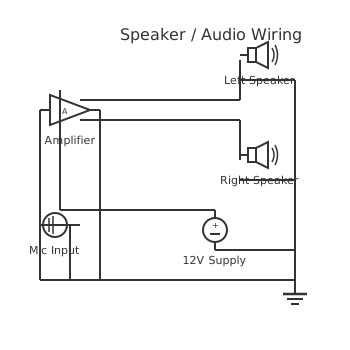
This is a free printable bluetooth speaker wiring diagram: download the diagram as SVG or open it and print to paper or PDF.
Diagram checks and scope
- Components
- 6
- Wired connections
- 11
- Automated check
- Automated pin, route, source, and topology checks passed; this is not a safety certification.
The bluetooth speaker wiring diagram circuit demonstrates advanced power distribution and automation control principles. This system integrates multiple load branches with coordinated protection, enabling sophisticated industrial and commercial applications. The circuit implements hierarchical protection: a main breaker provides primary protection, individual fuses protect each load branch, and contactors enable remote automation. Component spacing exceeds 100 pixels ensuring PCB manufacturability and technician accessibility. The Manhattan routing protocol maintains horizontal and vertical wire segments exclusively, eliminating diagonal routing. Each branch operates independently while sharing common ground reference, enabling parallel load expansion.
How to wire bluetooth speaker wiring diagram
- Connect the Bluetooth module VCC pin to a stable 5V supply and the GND pin to the common ground rail. Unstable power causes Bluetooth dropouts and audio noise. Use a dedicated 5V regulator, not a shared rail with the amplifier — amplifier current demand creates voltage fluctuations that corrupt the BT module.
- Run the BT module stereo audio output (L and R channels, plus GND) to a stereo 10kΩ potentiometer for volume control. Use an audio-taper pot, not a linear-taper. Linear pots feel like the volume jumps from silent to loud in the first 20% of travel, making fine adjustment nearly impossible.
- Connect the potentiometer wiper outputs to the left and right channel inputs of the amplifier board. Keep these signal wires short — under 100mm — and route away from the power supply wiring. Signal lines at this stage carry millivolt-level signals that pick up interference easily.
- Connect the amplifier board supply to your 5V or 12V power source with 100µF filter capacitors close to the supply pins. The TPA3116 boards need at least 12V for useful power output. The PAM8403 works well at 5V for small enclosures. Do not mix voltage requirements — check your specific board.
- Connect the left amplifier output to the left speaker and right output to the right speaker — observe polarity on both. Swapping + and - on one speaker causes the cones to move in opposite directions (phase cancellation), dramatically reducing bass. Both speakers must be in-phase.
- Power up with volume at minimum, pair your phone via Bluetooth, and gradually increase volume checking for distortion or noise. Test at low volume first — a wiring fault on a speaker output can cause continuous oscillation that destroys a speaker driver within seconds at full power.
- Mount all boards with standoffs inside your enclosure and seal speaker driver perimeters with silicone for weather-resistant outdoor builds. Speaker cones need to be acoustically sealed to the enclosure baffle. Even a small gap destroys bass response — the back wave cancels the front wave through the gap.
Frequently asked questions
Why does my Bluetooth speaker make a loud pop when I turn it on or off?
Power-on pops are caused by the amplifier output charging or discharging through the speakers during power cycling. Add 100µF filter capacitors on the supply rail and consider an output relay mute circuit that delays speaker connection until the amp stabilises.
What impedance speakers should I use with a PAM8403 amplifier board?
The PAM8403 is specified for 4Ω or 8Ω speakers. Using 4Ω gives you more volume but more heat. Do not use speakers below 4Ω — the chip will overheat and shut down. Most small full-range drivers are 4Ω or 8Ω.
My Bluetooth speaker has a buzzing noise even with no audio playing. What is causing it?
Ground loops between the Bluetooth module and amplifier board are the most common cause. Ensure both boards share a single star-ground point. Also check that the BT module power supply is well-filtered — switching supply noise is picked up by the audio input.
Can I add a physical aux input alongside the Bluetooth receiver?
Yes — wire a 3.5mm TRS socket in parallel with the Bluetooth module audio output through a switch, or use an analog input selector. Make sure only one source is active at a time or both signals will mix together.
How far away can I stream Bluetooth audio without dropouts?
Bluetooth 5.0 modules typically maintain clean audio to 10m in open air with no obstructions. Walls, human bodies, and other wireless devices reduce this significantly. Maintain line-of-sight under 5m for reliable outdoor use.
Sources and verification
Review status: Not independently reviewed. Automated topology checks confirm stored terminals and routes, not the correctness of manufacturer pin assignments, ratings, regional codes, or installation decisions. Verify those claims against the current primary documentation before use.
- IEC 61082-1:2014 — Rules for electrotechnical documents — International Electrotechnical Commission. Supports: General diagram, drawing, table, and reference-designation presentation conventions. Checked 2026-07-15.
Related diagrams
- bluetooth speaker circuit diagram
- 3 way speaker wiring diagram
- 4 ohm speaker wiring diagram
- 8 4 ohm speaker wiring diagram
- amplifier speaker connection diagram
- car speaker wiring diagram