Compact PLC (FX3U / LX3V style, AC powered) Symbol
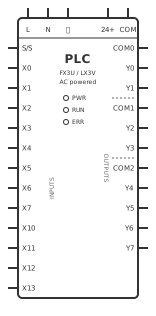
Definition: The Compact PLC symbol represents an all-in-one "brick" programmable logic controller in the Mitsubishi FX3U / FX1S and Wecon LX3V style: an AC-powered main unit with an L/N/PE mains supply, a built-in 24V DC sensor supply, 12 digital inputs (X0–X7, X10–X13) on a shared S/S common and 8 relay outputs (Y0–Y7) split into three output common groups (COM0, COM1, COM2).
Also known as: compact PLC, brick PLC, micro PLC, FX3U PLC, FX1S-20MR, LX3V-1208MR, Mitsubishi FX PLC, Wecon LX3V, relay output PLC, AC powered PLC.
What the Compact PLC (FX3U / LX3V style, AC powered) symbol means
Each terminal on the symbol corresponds to a screw terminal on the real controller. The supply side is L (AC line), N (AC neutral) and PE (protective / functional earth); AC-powered bricks of this family accept a wide-range 100–240 V AC supply. The 24V terminal (marked 24+ on many units) and the 0 V terminal (COM on this symbol, 0V on the unit) are an output from the PLC's internal service supply, intended for input switches and small sensors only.
The input side is S/S plus X0–X7 and X10–X13. Input addresses are octal, so the numbering jumps from X7 to X10 — there is no X8 or X9. S/S is the input common and also selects the wiring polarity: link S/S to 24V for sink inputs (an input turns on when its switch or NPN sensor pulls it to 0 V), or link S/S to 0V for source inputs (an input turns on when its switch or PNP sensor drives it to 24 V). The output side is eight relay contacts in three isolated groups: COM0 serves Y0–Y1, COM1 serves Y2–Y3 and COM2 serves Y4–Y7. When output Yn is on, its relay contact closes between Yn and that group's COM terminal.
How to identify the Compact PLC (FX3U / LX3V style, AC powered) symbol
On a schematic the compact PLC is drawn as one tall rectangle with the supply terminals (L, N, PE, 24V, 0V) along one edge, the S/S common and the X inputs down one side, and the COM/Y output groups down the other, each pin labelled with the manufacturer's terminal marking. That differs from a modular PLC, which is drawn as a CPU plus separate input and output card symbols. Mitsubishi-style X/Y octal addressing, the S/S terminal and the COM0/COM1/COM2 grouping are the giveaways that the drawing shows an FX-family or compatible brick.
Check the model suffix on the parts list: MR means relay outputs (what this symbol shows), MT means transistor outputs, which are polarity-sensitive DC switches wired differently. ES/ESS variants also exist; always match the terminal layout to the exact model's hardware manual.
Live editor identity: Live-library identity: `plc-compact-ac`, 140 × 300 canvas units, 29 logical terminals. Match this exact SVG and terminal list when identifying the placeable editor symbol; do not identify a physical package from the schematic outline alone.
Function and usage boundary
The PLC scans its inputs, runs the user program and updates its outputs, so in a control diagram it replaces hard-wired relay logic. Field devices such as push buttons, limit switches and 3-wire proximity sensors land on X inputs, powered from the PLC's 24V/0V terminals or a separate 24 V DC supply whose 0 V is shared with the input circuit. Loads such as contactor coils, solenoid valves, pilot lamps and small relays are switched by the Y relay contacts.
Typical wiring: feed L and N from a dedicated control MCB or fuse and connect PE to the panel earth bar. For sink inputs link S/S to 24V and wire each switch from its X terminal to 0V; for PNP sensors link S/S to 0V and wire the sensor output to the X terminal. On the output side bring the load supply to a group COM (for example 230 V AC line to COM1), take Y2 to a contactor coil A1, and return A2 to neutral. Because each COM group is isolated, one group can switch 24 V DC solenoids while another switches 230 V AC coils.
Usage boundary: Use the Compact PLC (FX3U / LX3V style, AC powered) abstraction only when the intended circuit can be expressed through these logical ports: `l` (L (AC line)), `n` (N (AC neutral)), `pe` (PE / functional earth), `p24` (24 V DC sensor supply +), `com` (0 V sensor supply common), `ss` (S/S (input common, sink/source select)), `x0` (Input X0), `x1` (Input X1), `x2` (Input X2), `x3` (Input X3), `x4` (Input X4), `x5` (Input X5), `x6` (Input X6), `x7` (Input X7), `x10` (Input X10), `x11` (Input X11), `x12` (Input X12), `x13` (Input X13), `com0` (Output common 0 (Y0–Y1)), `y0` (Output Y0), `y1` (Output Y1), `com1` (Output common 1 (Y2–Y3)), `y2` (Output Y2), `y3` (Output Y3), `com2` (Output common 2 (Y4–Y7)), `y4` (Output Y4), `y5` (Output Y5), `y6` (Output Y6), `y7` (Output Y7). Select a versioned physical profile and exact manufacturer datasheet before assigning package pins, ratings, or fabrication dimensions.
Logical terminals
The live editor exposes `l` (L (AC line)), `n` (N (AC neutral)), `pe` (PE / functional earth), `p24` (24 V DC sensor supply +), `com` (0 V sensor supply common), `ss` (S/S (input common, sink/source select)), `x0` (Input X0), `x1` (Input X1), `x2` (Input X2), `x3` (Input X3), `x4` (Input X4), `x5` (Input X5), `x6` (Input X6), `x7` (Input X7), `x10` (Input X10), `x11` (Input X11), `x12` (Input X12), `x13` (Input X13), `com0` (Output common 0 (Y0–Y1)), `y0` (Output Y0), `y1` (Output Y1), `com1` (Output common 1 (Y2–Y3)), `y2` (Output Y2), `y3` (Output Y3), `com2` (Output common 2 (Y4–Y7)), `y4` (Output Y4), `y5` (Output Y5), `y6` (Output Y6), `y7` (Output Y7). These are stable logical terminal IDs for diagram connectivity, not a promise that they equal physical package pin numbers.
| Logical ID | Editor terminal name |
|---|---|
| l | L (AC line) |
| n | N (AC neutral) |
| pe | PE / functional earth |
| p24 | 24 V DC sensor supply + |
| com | 0 V sensor supply common |
| ss | S/S (input common, sink/source select) |
| x0 | Input X0 |
| x1 | Input X1 |
| x2 | Input X2 |
| x3 | Input X3 |
| x4 | Input X4 |
| x5 | Input X5 |
| x6 | Input X6 |
| x7 | Input X7 |
| x10 | Input X10 |
| x11 | Input X11 |
| x12 | Input X12 |
| x13 | Input X13 |
| com0 | Output common 0 (Y0–Y1) |
| y0 | Output Y0 |
| y1 | Output Y1 |
| com1 | Output common 1 (Y2–Y3) |
| y2 | Output Y2 |
| y3 | Output Y3 |
| com2 | Output common 2 (Y4–Y7) |
| y4 | Output Y4 |
| y5 | Output Y5 |
| y6 | Output Y6 |
| y7 | Output Y7 |
Polarity and direction
Polarity or supply meaning is encoded on `pe` = PE / functional earth, `p24` = 24 V DC sensor supply +. Do not reverse these logical connections, and verify the physical package pin number in the exact device datasheet.
Reference designator
Project-defined: No single reference letter is asserted for this broad symbol. Apply the project standard and equipment-classification rules consistently.
Where the Compact PLC (FX3U / LX3V style, AC powered) symbol is used
- Small machine control panels such as conveyors, packaging machines, pumps and mixers
- Replacing relay-logic motor starters with PLC-controlled start/stop, interlock and alarm circuits
- Retrofits and AI-scanned photos of existing panels built around FX3U, FX1S or LX3V controllers
- Training rigs and student PLC labs wiring push buttons, sensors and pilot lamps to X/Y terminals
- Pump, fan and compressor controllers switching contactors and running a VFD through its digital inputs
Key facts
- Input and output addresses are octal: X0–X7 then X10–X13, so there is no X8 or X9.
- S/S sets input polarity: S/S to 24V gives sink inputs (NPN sensors, switches to 0V); S/S to 0V gives source inputs (PNP sensors, switches to 24V).
- Relay outputs are grouped: COM0 serves Y0–Y1, COM1 serves Y2–Y3, COM2 serves Y4–Y7, and each group can switch a different voltage.
- The 24V and 0V terminals are an output of the PLC's internal supply; never connect an external supply to them in parallel.
- Relay outputs are not fused internally: protect each COM group with a fuse or MCB sized for the load and the contact rating.
- Fit an RC snubber across AC contactor coils and a flyback diode across DC coils driven by relay outputs to extend contact life and reduce noise.
- Emergency stop and safety functions must be hard-wired or use a safety relay, not depend only on a standard PLC output.
Common interpretation mistakes
- Treating the Compact PLC (FX3U / LX3V style, AC powered) drawing (140 × 300 canvas units) as a physical footprint. The schematic outline expresses electrical intent; package and panel dimensions come from the selected physical profile.
- Copying `l`, `n`, `pe`, `p24`, `com`, `ss`, `x0`, `x1`, `x2`, `x3`, `x4`, `x5`, `x6`, `x7`, `x10`, `x11`, `x12`, `x13`, `com0`, `y0`, `y1`, `com1`, `y2`, `y3`, `com2`, `y4`, `y5`, `y6`, `y7` directly to a wire marker or manufacturer package pin number. These are logical Compact PLC (FX3U / LX3V style, AC powered) port IDs and require an exact ordered-part terminal map.
- Reversing a polarity-marked Compact PLC (FX3U / LX3V style, AC powered) terminal because the symbol was rotated or mirrored on the sheet.
Frequently asked questions
Why do the inputs go from X7 to X10?
Mitsubishi FX-family and compatible PLCs number X inputs and Y outputs in octal (base 8). After X7 comes X10, so a 12-input unit has X0–X7 and X10–X13. There is no X8 or X9, and programs must use the same octal addresses.
What is the S/S terminal on a PLC?
S/S is the common for all the X inputs and chooses sink or source wiring. Link S/S to 24V and each input turns on when it is pulled to 0V (sink inputs, NPN sensors). Link S/S to 0V and each input turns on when it receives 24V (source inputs, PNP sensors). All inputs on that common share the same choice.
Should I use NPN or PNP sensors with this PLC?
Either, as long as S/S matches. NPN (sinking) 3-wire sensors need S/S to 24V; PNP (sourcing) sensors need S/S to 0V. Power the sensors from the PLC's 24V/0V terminals or from a separate 24 V supply whose 0 V is tied to the input circuit.
What do COM0, COM1 and COM2 do?
They are the commons of the relay output groups. Each Y output is a contact between that Y terminal and its group COM: COM0 serves Y0–Y1, COM1 serves Y2–Y3 and COM2 serves Y4–Y7. Bring the load supply to the COM terminal and wire the load from the Y terminal back to the supply return. Keep each group at one voltage.
Can the PLC relay outputs drive a motor directly?
No. The relay contacts are rated for only about 2 A each. Use a Y output to switch a contactor coil (or a VFD digital input), and let the contactor or drive switch the motor current.
Can I power solenoid valves from the PLC's 24V terminal?
Only very small loads, and generally it is better not to. The internal 24 V service supply is limited to a few hundred mA and is meant for inputs and sensors. Feed output loads such as valves and lamps from a separately fused 24 V DC power supply wired to the output COM.
Sources and verification
- IEC 60617:2026 DB — Graphical symbols for diagrams (International Electrotechnical Commission) — The current official IEC graphical-symbol database and the electrotechnical areas it covers. Exact symbol identity data requires IEC access.; claim scope: standards
- IEEE/ANSI 315-1975 — Graphic Symbols for Electrical and Electronics Diagrams (IEEE Standards Association) — The official catalogue record for North American diagram symbols and reference-designation letters; IEEE lists the standard as inactive-reserved.; claim scope: standards, reference_designator
- IEC 61666:2010+AMD1:2021 — Identification of terminals within a system (International Electrotechnical Commission) — General principles for identifying terminals within systems; it does not replace the exact ordered-device datasheet.
- IEC 81346-2:2019 — Object classes and reference-designation codes (International Electrotechnical Commission) — The official classification scheme used to form reference designations across technical disciplines.; claim scope: reference_designator
- IEC 61082-1:2014 — Preparation of documents used in electrotechnology (International Electrotechnical Commission) — General presentation rules for electrotechnical diagrams, drawings, and tables.; claim scope: standards, usage
Geometry fingerprint: 19a430b61709bcf2. A changed SVG, canvas size, or terminal definition invalidates the recorded review.
Related symbols
- Contactor Coil symbol
- Circuit Breaker (MCB) symbol
- Push Button NO symbol
- Pilot Light / Indicator symbol
- PLC CPU symbol
- Power Supply 24V DC symbol
- Proximity Sensor (Inductive) symbol
- Relay Coil symbol
Physical components that use this symbol
A schematic symbol defines electrical intent; the physical profile adds package or panel dimensions and mounting data.
Place the Compact PLC (FX3U / LX3V style, AC powered) symbol directly on a wiring diagram or schematic in the free online editor — no download required.