How to Wire Electric meter connection diagram: Installation, Testing, and Troubleshooting
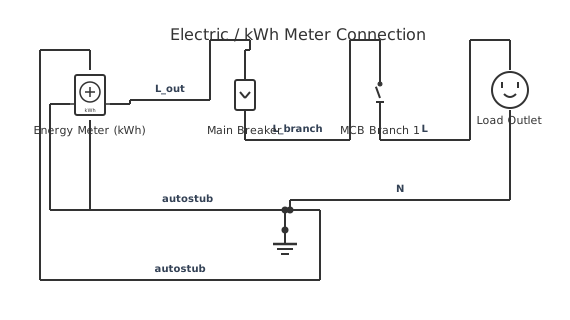
This is a free printable electric meter connection diagram: download the diagram as SVG or open it and print to paper or PDF.
This Electric meter connection diagram shows 7 components and 9 routed connections, including 1 × Supply (AC voltage source), 1 × kWh (Energy Meter), 1 × Q1 (Switch Dpst), 1 × F1 (Mcb) and 1 × Load (Outlet). Use it to inspect the shown topology, then confirm ratings and terminal assignments against the equipment documentation for your installation.
Diagram checks and scope
- Components
- 7
- Wired connections
- 9
- Automated check
- Automated pin, route, source, and topology checks passed; this is not a safety certification.
What this Electric Meter Connection Diagram drawing contains. The rendered example uses 1 × Supply (AC voltage source), 1 × kWh (Energy Meter), 1 × Q1 (Switch Dpst), 1 × F1 (Mcb), 1 × Load (Outlet), 1 × N (neutral rail) and 1 × PE (protective earth). Lighting drawings must keep the line, switched line, neutral and protective-earth functions unambiguous across every switching point. The component names in the list below come from the editable canvas, while the wire summary comes from the saved start and end terminals. This makes the written explanation auditable against the image instead of presenting an unrelated stock circuit.
Reading the stored graph from terminal to terminal gives this sequence: 1. Supply pos terminal connects to kWh l1 terminal. 2. Supply neg terminal connects to kWh n terminal. 3. kWh l1 out terminal connects to Q1 in1 terminal. 4. kWh n out terminal connects to Q1 in2 terminal. 5. Q1 out1 terminal connects to F1 line terminal. 6. Q1 out2 terminal connects to N top terminal. 7. F1 load terminal connects to Load hot terminal. 8. Load neutral terminal connects to N bottom terminal. 9. Load ground terminal connects to PE gnd terminal. The drawing uses terminal endpoints rather than relying on unverified colour conventions. A line joining two terminals records electrical continuity in this reference; visual proximity alone does not create a connection. Junctions, bridges and terminal labels therefore matter when the drawing is edited or exported.
Trace the live path through protection and the switching contacts to the luminaire, then follow the neutral return independently. Multiway arrangements use common and traveller terminals whose physical positions vary by device. In this particular graph, the first visible path is Supply pos terminal connects to kWh l1 terminal., Supply neg terminal connects to kWh n terminal., kWh l1 out terminal connects to Q1 in1 terminal. and kWh n out terminal connects to Q1 in2 terminal.. Follow the remaining rows in the connection table before changing a symbol or moving a conductor, because a neat layout is not evidence that a terminal function is correct.
Confirm the supply system, switch terminal markings, lamp or driver compatibility, neutral availability and earthing requirements. Dimmers and electronic drivers also require an explicit load-type and minimum-load check. Automated validation checks that component IDs and terminal IDs exist, routes terminate on pins, the graph has a recognized source, and the saved topology has no blocking structural fault. It does not determine conductor size, protective-device rating, fault current, insulation class, environmental suitability or compliance with local rules. Those decisions require project values and the current primary documentation.
How to wire electric meter connection diagram
- Read the Electric Meter Connection Diagram source path For this electric meter connection diagram, begin at Supply (AC voltage source) and trace every stored terminal pair toward the load or output; do not infer continuity from lines that merely cross.
- Match every terminal name Compare the Electric Meter Connection Diagram terminal labels shown in the connection table with the current device or standard documentation before assigning real conductors.
- Set project-specific ratings Replace placeholder values in the electric meter connection diagram with verified voltage, current, protection, conductor and environmental data for the actual installation.
- Run the electrical checks again After editing kWh (Energy Meter) or any route, validate the graph and inspect every reported open terminal, source fault, collision and disconnected island.
- Release a controlled copy Export the revised Electric Meter Connection Diagram drawing only after a competent reviewer has compared it with the bill of materials, manufacturer documents and applicable rules.
Specifications
| Topic | Electric Meter Connection Diagram |
|---|---|
| Components shown | 7 |
| Routed connections | 9 |
| Named nets | None stored |
| Verification scope | Stored pins, routes, source path and graph topology |
Safety warnings
- Prove the circuit dead with an appropriate method before touching fixed wiring.
- Keep neutral and protective earth separate except at the bonding point defined by the supply system and local rules.
Tools needed
- The current manufacturer datasheet, connector schedule or applicable standard for every real device
- A suitable meter and proving method for the voltage class being worked on
- The editor validation report and a controlled terminal or wire schedule
Common mistakes
- Treating the electric meter connection diagram illustration as proof of a manufacturer pinout or conductor rating when those values are not encoded in the graph.
- Connecting by component position or wire colour instead of checking the named terminals in the Electric Meter Connection Diagram connection path.
- Using terminal position or wire colour to identify common and traveller conductors instead of testing and reading the device markings.
Troubleshooting
- The Electric Meter Connection Diagram path appears open
- Cause: A route ends on the wrong pin, a terminal was renamed, or a required return path is absent. Fix: Trace the connection rows in order, restore the documented terminal mapping, and run validation again.
- The edited drawing passes visually but validation fails
- Cause: A conductor may stop off-pin, cross a component body, create a source short or leave a disconnected island. Fix: Open each blocking finding, correct the referenced component or route, then re-run the topology check before export.
- The real equipment behaves differently
- Cause: The stored reference does not match the exact model, revision, supply or contact state. Fix: De-energize safely, return to the current primary documentation, and revise the symbol terminals and values before further testing.
Frequently asked questions
What exactly is verified on this electric meter connection diagram?
The saved Electric Meter Connection Diagram graph is checked for known components and terminals, pin-snapped routes, a recognizable source path and blocking topology defects. Exact equipment ratings and manufacturer assignments are outside that automated scope.
Which components are actually shown in this Electric Meter Connection Diagram diagram?
The current editable graph contains 1 × Supply (AC voltage source), 1 × kWh (Energy Meter), 1 × Q1 (Switch Dpst), 1 × F1 (Mcb), 1 × Load (Outlet), 1 × N (neutral rail) and 1 × PE (protective earth). The bill of materials on this page is derived from those saved symbols rather than a generic shopping list.
How are the electric meter connection diagram connections documented?
The graph contains 9 terminal-to-terminal links. The first path shown is Supply pos terminal connects to kWh l1 terminal.
Can I use the drawing as an installation instruction?
Use it as an editable reference and review aid. Verify the exact equipment documentation, ratings, protection, conductor selection and local requirements before construction or release.
Sources and verification
Review status: Not independently reviewed. Automated topology checks confirm stored terminals and routes, not the correctness of manufacturer pin assignments, ratings, regional codes, or installation decisions. Verify those claims against the current primary documentation before use.
- IEC 61082-1:2014 — Rules for electrotechnical documents — International Electrotechnical Commission. Supports: General diagram, drawing, table, and reference-designation presentation conventions. Checked 2026-07-15.
Related diagrams
- residential electric meter box wiring diagram
- electric board connection diagram
- 200 amp meter base wiring diagram
- 240v electric water heater wiring diagram
- 3 phase 4 wire energy meter connection diagram with ct
- 3 phase energy meter connection diagram with ct